Servlet Containers
Servlet containers handle the HTTP requests and responses. They also know which Java bean to call for each request.
A container receives the request. It runs through the HTTP filters. Then it calls the Java class or method that handles the request.
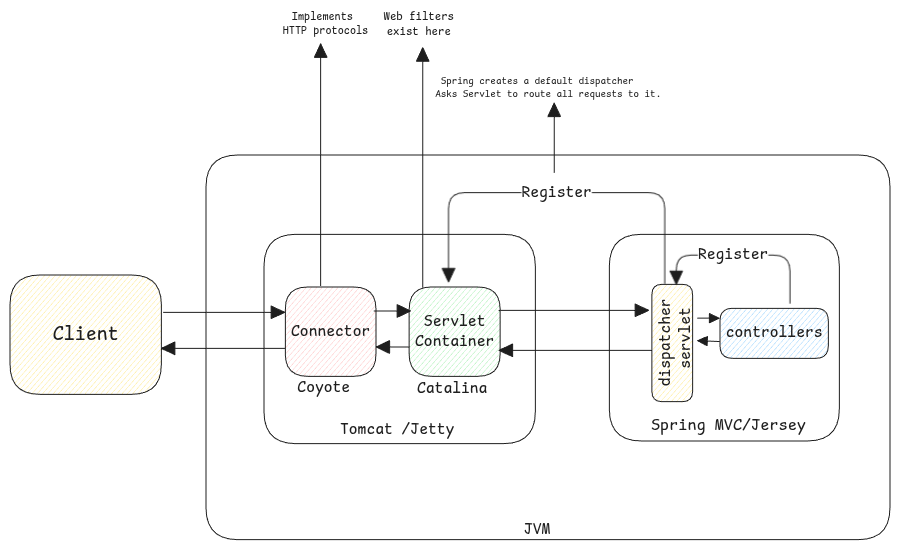
Servlet containers vs HTTP Servers
Plain HTTP servers only implement the HTTP protocol. They serve only static content.
Servlet containers can serve dynamic content.
Convert HTTP to Java Objects
In tomcat, the web server turns the raw HTTP request data into a structured Java object.
This includes extracting headers, session, parameters and request body.
Using epoll in Servlet Containers
Relation Between Java and Kernel Objects
import java.nio.channels.*;
import java.net.InetSocketAddress;
import java.nio.ByteBuffer;

public class NioServer {
    public static void main(String[] args) throws Exception {
        // Create a Selector
        //creates an epoll table - epoll_create()
        Selector selector = Selector.open();

        // Create and configure ServerSocketChannel
        ServerSocketChannel serverChannel = ServerSocketChannel.open();
        serverChannel.bind(new InetSocketAddress(8080));
        serverChannel.configureBlocking(false);

        // Register ServerSocketChannel with Selector for OP_ACCEPT
         // adds the created channel to the created epoll_create() table
         // and tells about the events that are useful for it.
         // this means its ready to be accepted. Inform any channels that are ready to be accepted.
        serverChannel.register(selector, SelectionKey.OP_ACCEPT);

        while (true) {
            // Block until at least one channel is ready. Meaning its put to sleep.
            // calls the epoll_wait() method to wait until an event occurs.
            // This part of thread is put to sleep until there is an event for any of the registered channels.
            selector.select();

            // Process ready channels
            for (SelectionKey key : selector.selectedKeys()) {
                if (key.isAcceptable()) {
                    // New client connection
                    ServerSocketChannel server = (ServerSocketChannel) key.channel();
                    // creates new FD for the accepted channel. Its moved to a different FD.
                    SocketChannel client = server.accept();
                    if (client != null) {
                        client.configureBlocking(false);
                        // Register client SocketChannel for reading
                        // Now register this to the selector when its ready for reading.
                        client.register(selector, SelectionKey.OP_READ);
                        System.out.println("New client connected: " + client.getRemoteAddress());
                    }
                } else if (key.isReadable()) {
                    // Data available to read from a client
                    SocketChannel client = (SocketChannel) key.channel();
                    ByteBuffer buffer = ByteBuffer.allocate(1024);
                    int bytesRead = client.read(buffer);
                    if (bytesRead == -1) {
                        // Client disconnected
                        client.close();
                        System.out.println("Client disconnected");
                    } else if (bytesRead > 0) {
                        buffer.flip();
                        System.out.println("Received: " + new String(buffer.array(), 0, bytesRead));
                        // Echo back to client
                        client.write(buffer);
                    }
                }
            }
            // Clear processed keys
            selector.selectedKeys().clear();
        }
    }
}