Files
It's important to understand file management since everything is a file in Unix. Also since all IO involves files, understanding the foundation of it's necessary in building high-performance applications. Everything in this document can be applied to all IO and not just regular hard disk files.
Creating a new Java File object doesn't open the file. Only creating a stream or channel will open the file.
Byte Buffers
ByteBuffer is a type in Java which allocates a fixed and continuous memory space just to hold binary data. This is the type used in all IO operations.
Here there is no actual byte buffer used. It's called buffer since it just acts as a bridge between JVM and the underlying file system.
HeapByteBuffer
In case of files, buffers are just a bridge between JVM and the underlying file system. It's fixed amount of memory allocated in JVM heap and the system call copies data from kernel space to this buffer and then JVM can read from it.
When we ask for the next set of bytes, the system call will copy the next set of bytes to the same buffer.
This is the only type which actually has a buffer. The rest of the types have the word buffer in it, but they don't have actual buffer.
MappedByteBuffer
This is Java's implementation of MMIO. The difference is, MMIO is for allowing CPU and kernel to access hardware devices directly using memory addresses. Whereas mmap is for mapping files into memory space of the process and access it as if it were part of the process's memory.
Since system calls are costly, using memory mapped files avoid multiple system calls. This is because, once the file is mapped into memory, all read/write operations are done using memory access instructions and not system calls.
Since loading any file from ROM into memory includes the page cache, writing or reading data, it will be directly happening on the page cache. Writing to page cache avoid IO since updating page cache will mark the pages as dirty and kernel will automatically flush the changes to disk.
In this case, the file is loaded into the memory and then this part of memory address is mapped into the JVM process's memory space.
MappedByteBuffer is Java's wrapper to mmap() function. Even the fileChannel.map() does the same.
DirectByteBuffer
In this case, buffers are requested additionally from memory outside of JVM.
The advantage is, the JVM memory is kept free for other tasks and IO operations are performed using buffers outside of the JVM.
Direct buffers are wrappers to malloc() native methods. Not that they're nothing to do with files and are normally not used at all for file IO. It's internally used by network IO to copy data directly to and from JVM memory.
Stream vs Buffer
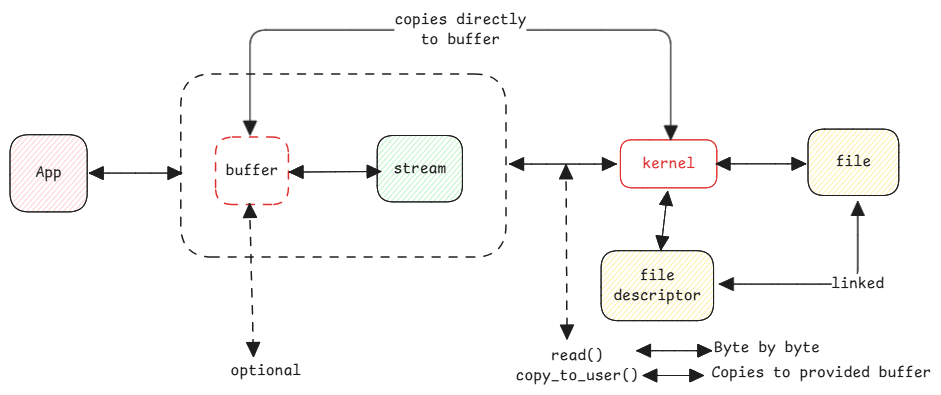
Streams in Java are nothing but the operating system's IO using file descriptors.
For example, when a file input stream is opened then the corresponding file descriptor is created. A read call on the file descriptor then reads the file associated with the file descriptor.
Streams don't have any memory. They must be routed to an other output to process data such as buffer, system out, array, etc. This means, when data is provided by the read system call, it's only reading one byte at a time.
Copying between user and kernel space
When streams are used without buffers, the kernel doesn't copy data between two memory spaces. Instead for every byte a function call is done to kernel and kernel returns the next byte.
In case of buffers, the address of the buffer is passed to kernel and kernel copies data to that buffer directly as part of system call.
when a stream is directly used without buffer, it translates to read method to kernel. This method returns next byte. The file descriptor linked to the stream knows the last read byte (offset).