Disks
Hard Disk Drives (HDD)
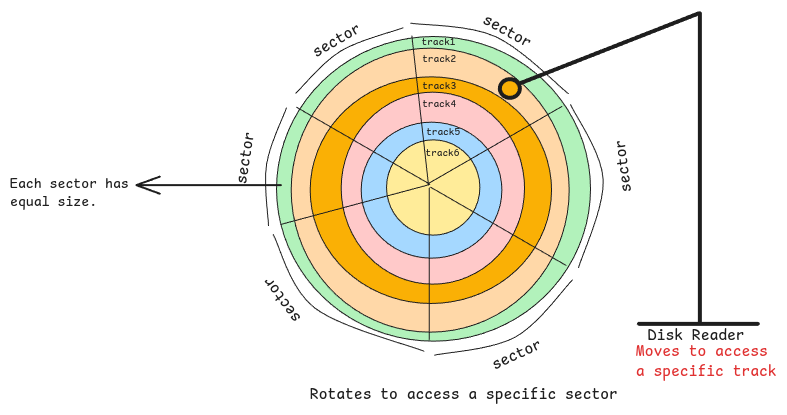
They're mechanical drives. The disk is divided into tracks and sectors. The intersection of a track and a sector is a block.
This is the smallest unit of storage. Say the sector size is 4KB. Then even an empty file gets a 4KB block on the disk.
Physical vs Logical Sector Size
The physical sector size may be 4KB. For some reason, there is also a logical sector size. It can be just 512 bytes. This helps, for example, when you store many small files.
The OS and kernel assume every block is 512 bytes. The storage firmware then maps the logical sector addresses to the physical ones.
The physical sector is larger than the logical one. The OS sends write requests to a logical sector address. The firmware then loads the matching physical sector into its buffer. It updates the full physical sector and writes it back.
IO Size vs Sector Size
IO size is the largest data a single read or write can handle. Sector size is the smallest data the storage can address and read.
For example, say the I/O size is 4096 bytes and the logical sector size is 512 bytes. Then up to eight logical sectors are handled in one go. This batching cuts overhead and improves throughput.
Disk Hardware
Storage disks come with built-in firmware and a microcontroller that runs it.
This firmware handles logical to physical sector mappings and LBA (Logical Block Addressing) mappings. It also processes read and write requests from the CPU, and more.
When the CPU asks for data at a location, the firmware translates the address. It picks the data and places it in memory.