Bytes to String Conversion
We always hear that data is stored in binary, zeros and ones. Still, it isn't clear how this binary is decoded and shown as strings or other readable data.
Encoding and Decoding
When the source system builds a message for the destination, the producer app encodes the string to byte data.
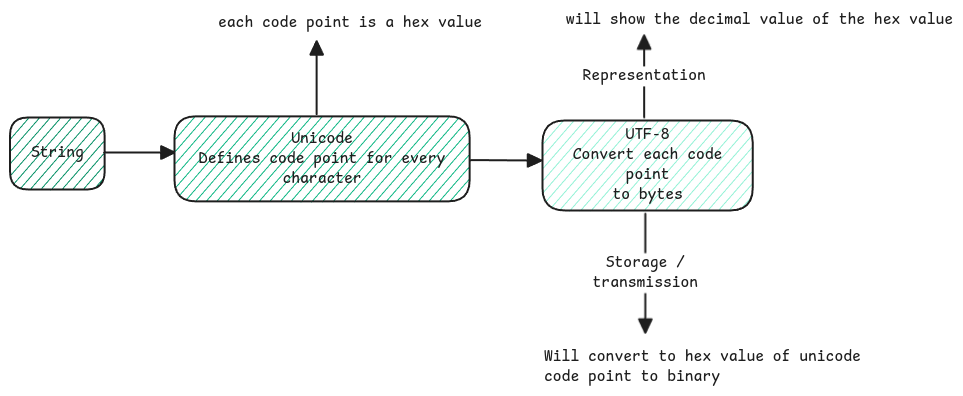
Unicode is the universal standard. It gives a hexadecimal code point to each character in all languages.
UTF-8 is the Unicode Transformation Format. It encodes these code points into a variable-sized byte form. See character set page for more details.
Byte Data Representation
Bytes are just 8 bit binary data. When you run programs, the debugger doesn't show the raw binary. It shows the decimal values.
Application Layer
An app sends an HTTP request or response. The headers are joined into one string, split by new lines. Then they're converted to Unicode and encoded to UTF-8.
Same process will be applied for request/response body.
Any data into the app is always binary. It's decoded by whatever encoding was used to send it.
Byte Order
When bytes move between systems, the receiver must know the order to process the bytes of a character.
Byte order is about the order of bytes in a multi-byte value. If a Unicode character is many bytes, byte order says which byte is first.
Byte order has two forms.
- Big Endian - Means the bits are processed from left to right. Like the usual way of reading.
- Little Endian - Here the bits are processed from right to left. The opposite way of reading.
the Big-Endian / Little-Endian naming comes from Gulliver's Travels, where the Lilliputans argue over whether to break eggs on the little-end or big-end.
Character Boundary
When a full string is streamed as UTF-8 data, the receiver must know which bytes go with which character. This matters because UTF-8 uses multiple bytes to support all languages.
The first few bits of a byte tell the decoder how many bytes, with the current one, form a character. No extra byte marks the start of a new character.
0xxxxxxx: A single-byte character. 110xxxxx: A two-byte character. 1110xxxx: A three-byte character. 11110xxx: A four-byte character.