Terminals
Terminals are desktop applications, like a browser. A browser can open many web apps. In the same way, a terminal can open many apps, such as bash, nushell, zsh, or even a python REPL.
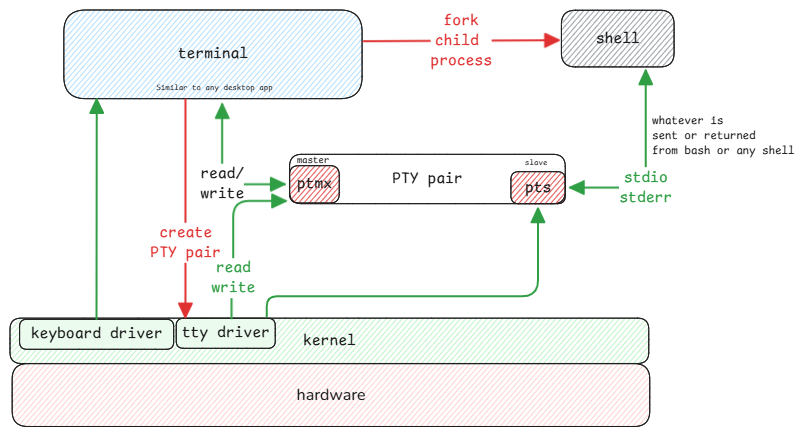
Terminal software is what you manually choose by starting it. The default application the terminal starts is the shell and is part of the user configuration.
Real vs Pseudo Terminals
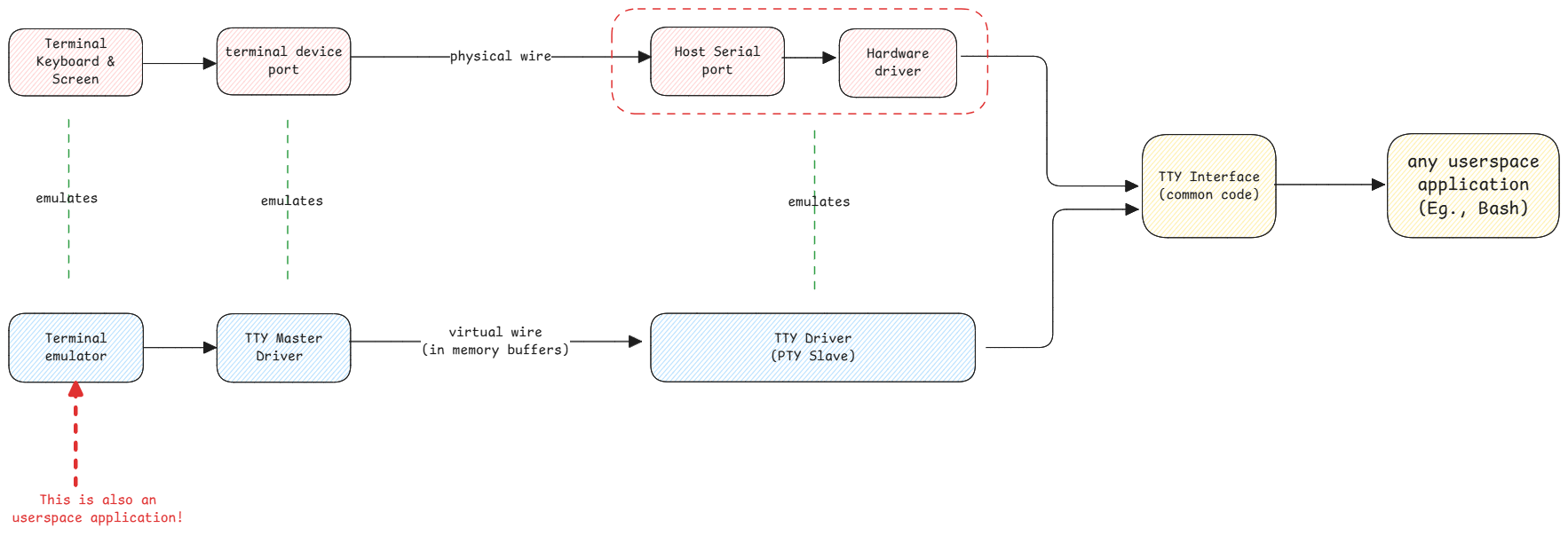
Pseudo terminal apps just emulate what physical terminals did in the past.
Line Discipline
In a terminal, the line discipline is the way input and output are handled.
This discipline is handled by the slave TTY driver. It ensures the characters are sent to the end program only after enter is received, or if there is a Ctrl+C received, it will interrupt the program by scheduling an interrupt handler. See details in the signals page.
- When you type characters, they show on screen. But they aren't sent to bash or any forked program yet.
- When the Enter key is pressed, the line discipline sends the entire line to the program.
- Terminal also handles special keys like Ctrl+C, which sends a signal to the program to interrupt it.
Shell doesn't display anything
Whatever you type in the terminal isn't the bash feature. Terminal just displays whatever events it receives from the keyboard.
Terminal apps like vim, less, and top must know which terminal runs them. The shell builds output and escape characters based on the terminal.
It reads $TERM, then gets the details from /usr/share/terminfo.
Receives input → displays it on screen → send to master → TTY driver sends it to slave → slave is connected to bash → bash reads input from slave.
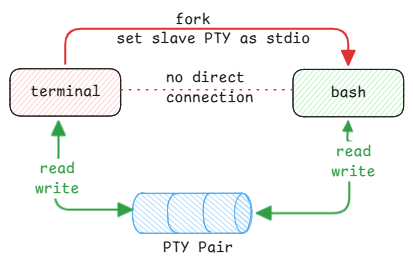
Even though it looks like Bash is doing all by itself, it's the terminal which sends the input to the bash process and displays the output from bash.
tty command
The 'tty' command shows which slave device is connected to the current shell. Each shell knows only its slave device. It reads input and writes output there.
Terminal Configuration
Each user's default shell is set in the /etc/passwd file.
When you connect to a machine with SSH, the terminal is on your local machine. The SSH server creates a bash process on the remote machine.
The SSH server makes a slave device for bash. The SSH client makes a master device for the terminal. The flow is the same. Just the slave is remote and the master is local.
Terminal Prompt
The prompt is just another stdout bash returns to the terminal. Bash has a config to return a set string whenever it's ready for a new command.
It returns the same prompt after the last command runs.
oh-my-posh and nerd-fonts
The relation between these projects are exactly what's described above.
- oh-my-posh is a shell prompt theme engine. It builds the prompt string. It sets the shell to make the prompt with Unicode characters.
- nerd-fonts is a set of fonts with extra glyphs and icons. The Unicode values from the shell prompt are rendered with these fonts.
tmux - Terminal Multiplexer
When the terminal window is killed, then the bash process as well as the connection to the PTY is gone. Which means the entire session is lost.
Another big advantage is that, tmux makes the entire management of terminals programmable. Which means, we can start terminals, split, close and many more which can't be done by regular terminal applications.
tmux solves this problem by hosting the PTY process outside the terminal application. It uses a client server architecture by making the server durable and holding all the session data.
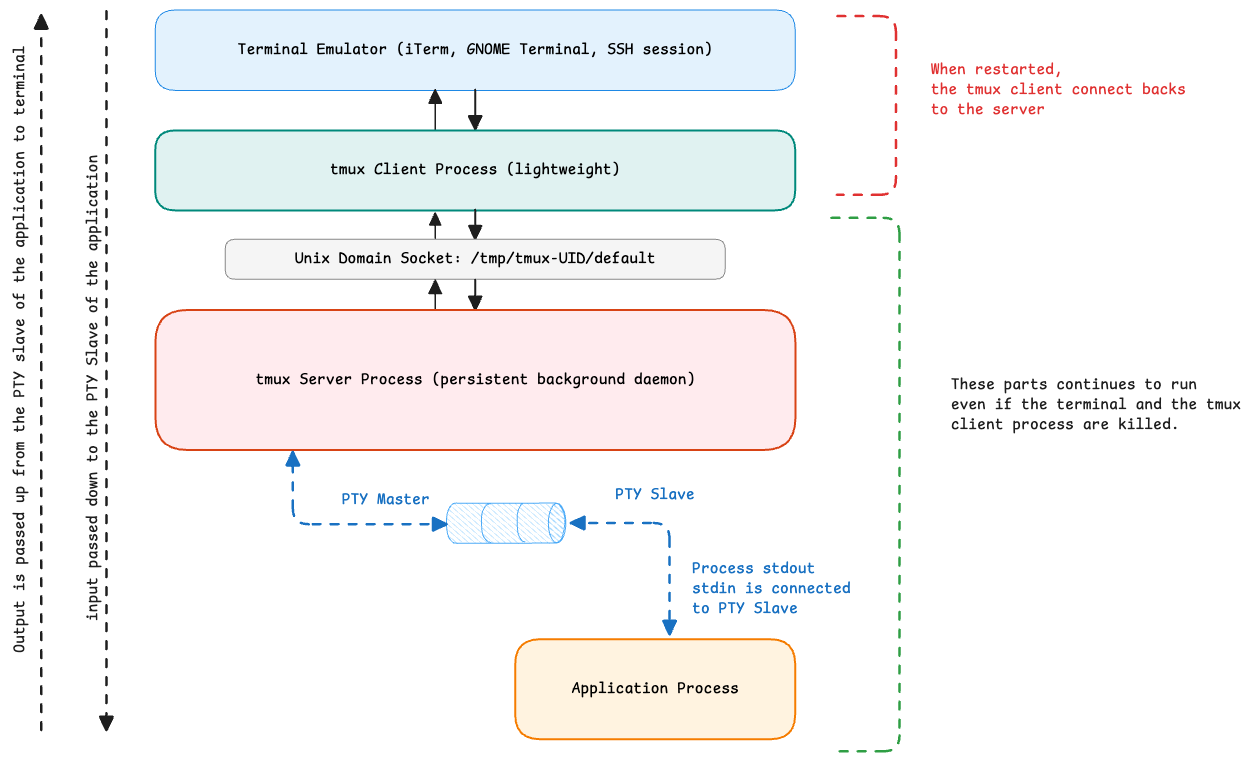
tmux is useful for SSH too by doing an SSH into the server and then starting the tmux on it and then executing commands. Next time when we SSH, we can directly attach again to the same tmux session and continue from where left off.