Namespaces
Namespaces are a logical split of processes by the kernel. When you start a process, you can give it 0 or 1-N types of namespaces.
- 0 means, the newly started process inherits everything from the parent PID.
- 1-N means, we can specify a namespace for each resource the process likes to access
Namespaces in linux is per thread. When we start a process with certain namespace, then the main thread uses this namespace. Other threads of the process can simply use another namespace.
Namespaces are just kernel objects and can exist even without a process. It's used only when a process is really started to run using them.
Impact on kernel
One idea is key. The kernel is just like any other program. It stores its runtime data in C structures.
- These C structures are namespace specific.
- The same kernel code runs each time. Only the data it works on changes, based on the namespaces.
Everything in Linux runs as a process and every process has a set of namespaces.
This is exactly what makes namespaces work. When the kernel runs a function, it pulls the namespace data of that process and runs.
Namespace selection
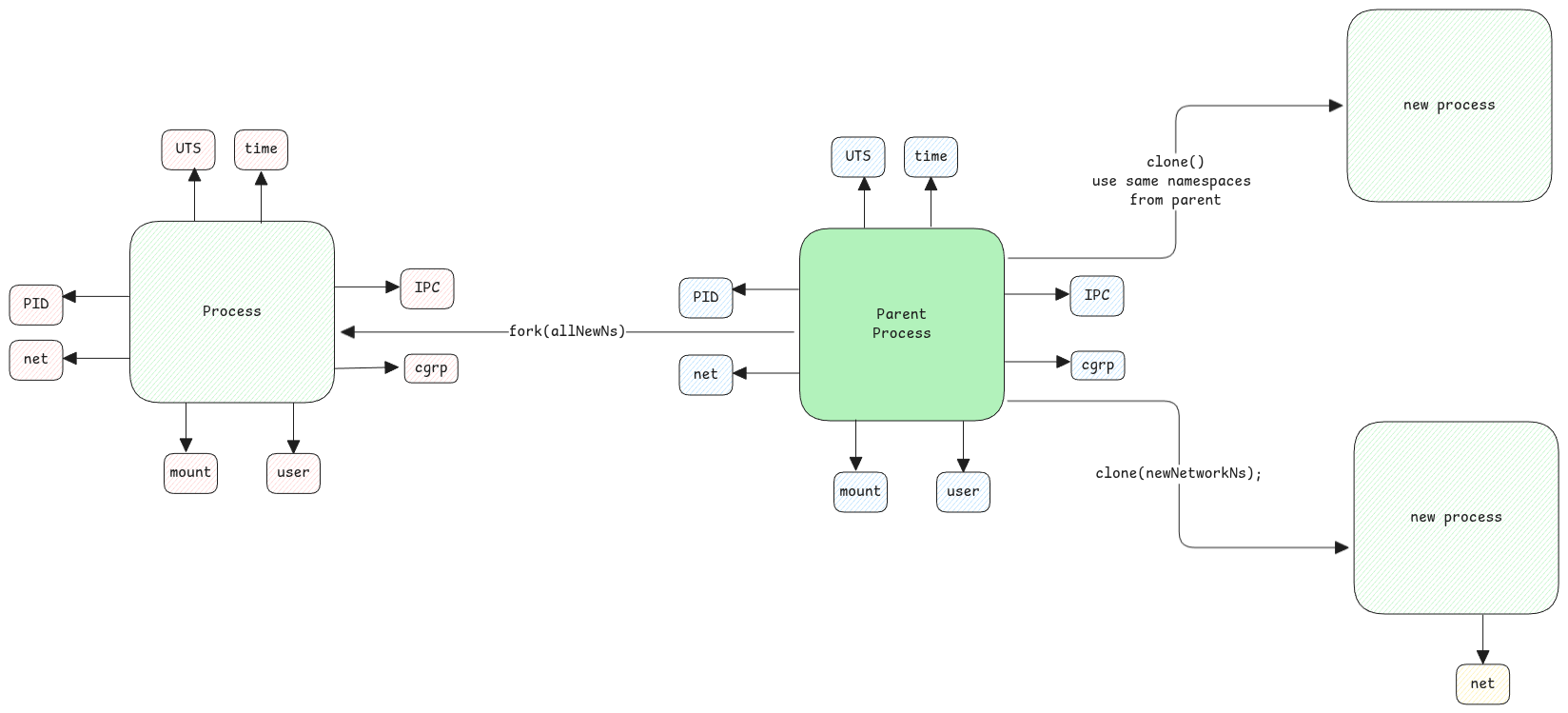
A common myth is this. We think a process starts in its own namespace. It gets its own PID, mount, net, and other namespaces. This isn't true at all.
You can start a process with only its own network namespace. It can inherit the rest from its parent process.
When a process starts, you can choose the namespaces it uses. For example, start a process with no mount namespace. Then it sees the same filesystem as its parent.
Examples
- Docker creates the app process with all the namespaces it needs for full isolation.
- In Kubernetes, a Pod has only its own network, UTS (hostname), and IPC namespace.
Isolation Levels
| Resource | One single engine in the kernel | Each namespace gets its own private… | Example command to see the difference |
|---|---|---|---|
| Network | ip_forward(), ip_route_output(), etc. | routing tables, interfaces, IP rules, netfilter tables, conntrack | ip netns listip route show |
| Mount | do_mount(), VFS path lookup code | mount points, root filesystem, /proc, /sys, /dev | mount, dfls /proc/self/mounts |
| PID | schedule(), kill(), task struct handling | process tree, PID numbers, /proc visibility | ps auxls /proc (compare host vs container) |
| User | credential checking code | UIDs, GIDs, capabilities, user/group mappings | idwhoami |
| UTS | hostname & domain name system calls | hostname, NIS domain name | hostname uname -n |
| IPC | System V & POSIX message queue code | message queues, semaphores, shared memory segments | ipcs -q, ipcs -m, ipcs -s |
| cgroup | cgroup core controller code | cgroup hierarchy membership, resource limits (CPU, memory, etc.) | cat /proc/self/cgroupsystemd-cgls |
| Time | clock access system calls (since kernel 5.6) | offsets for CLOCK_MONOTONIC, CLOCK_BOOTTIME | clock_gettime(CLOCK_MONOTONIC) inside vs outside container |
Each namespace provides different levels of isolation based on the type of resource.
- PID namespace - this one is hierarchical. The parent can still see the processes in the child namespace.
- Net namespace - this one is fully isolated. Network namespaces aren't hierarchical. Each talks to the network hardware as a separate network.
- Mount namespace - all the host data is visible to every mount namespace. It only changes the logical 'view' of the paths on the disk.
A mount namespace isn't for disks or filesystems. It's only for mount points. This nuance is important.
How different namespaces are created
Each namespace type, such as PID, network, or mount, is backed by a kernel C structure. When you create a new namespace of a type, a new object of this structure is made. It's linked to the process's nsproxy structure.
nsproxy struct
As we know every process in Linux has a corresponding struct task_struct. See the linux process structure doc for more details.
This struct has a pointer to another one, struct nsproxy. That structure references all the process's namespace objects.
Standard Streams
Start a docker container, or any process with an isolated namespace. Its standard streams are set to the parent process that ran it. That's why the app's output shows on the terminal that started it.