Network Devices
Kernel as Router
A Linux host has just one router. This router handles all namespaces.
Each network namespace has its own routing table. When a packet comes from or goes to a virtual device in a namespace, the router switches to that namespace's config and handles it.
It feels like routing happens at container level. Yet it's actually all happening at host level.
Enable Kernel as router
To make the kernel act as a router, set net.ipv4.ip_forward=1.
See router definition for the background.
When this is 0, the kernel does no IP forwarding.
It handles only what comes to its own IP address.
C Structure for NIC
net_device is the kernel C structure representing a network device. Both physical and virtual devices are represented using this structure.
For the kernel, every network device is the same. It treats them all the same way. The only difference is who creates it.
How physical and virtual devices created
Physical devices are created by device enumeration and configured by kernel using its device drivers.
Virtual devices are added by userspace apps. The kernel then creates the memory structures to represent them.
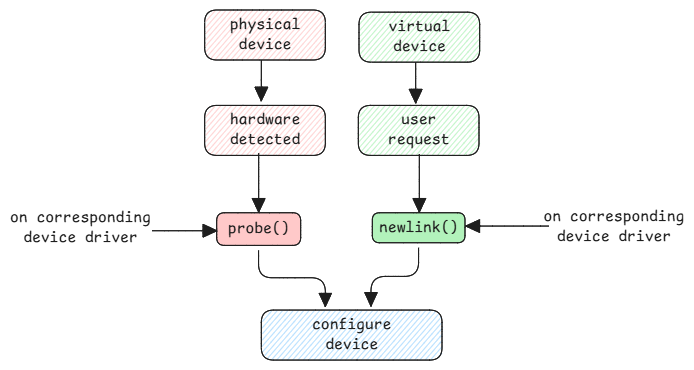
While creating virtual devices, the term "link" is used because network devices operate at the data link layer (Layer 2) of the OSI model.
Similar to physical devices, virtual devices also need drivers to manage them. When a virtual device is created, the corresponding driver is also loaded to handle it.
Virtual Ethernet Pair - A virtual wire
When you create a veth pair, you just connect two virtual devices. It stands for a virtual cable between two devices. See also switching page to understand the mental model.
# System call to kernel to create device veth0 of type veth and connect it to peer veth1
ip link add veth0 type veth peer name veth1
Every virtual Ethernet device structure has a peer pointer. It points to another virtual Ethernet structure. On a send request from the source device, the data is copied straight to the peer's buffer. This simulates data transfer over a cable.
Just like data is copied from source veth to peer veth, if the peer connects to a bridge or switch port, the data is copied to that port's memory.
This is also how data moves in physical systems.
How multiple IP addresses on the same device work
It doesn't matter how many IP addresses a device has. What matters is which network each IP puts the device on. And how the routing rules link these networks.
- With many IP addresses, the ARP request must answer for all of them with the MAC address.
- Once received, the kernel checks if a process listens on that IP and port. If yes, it forwards the data to that process.
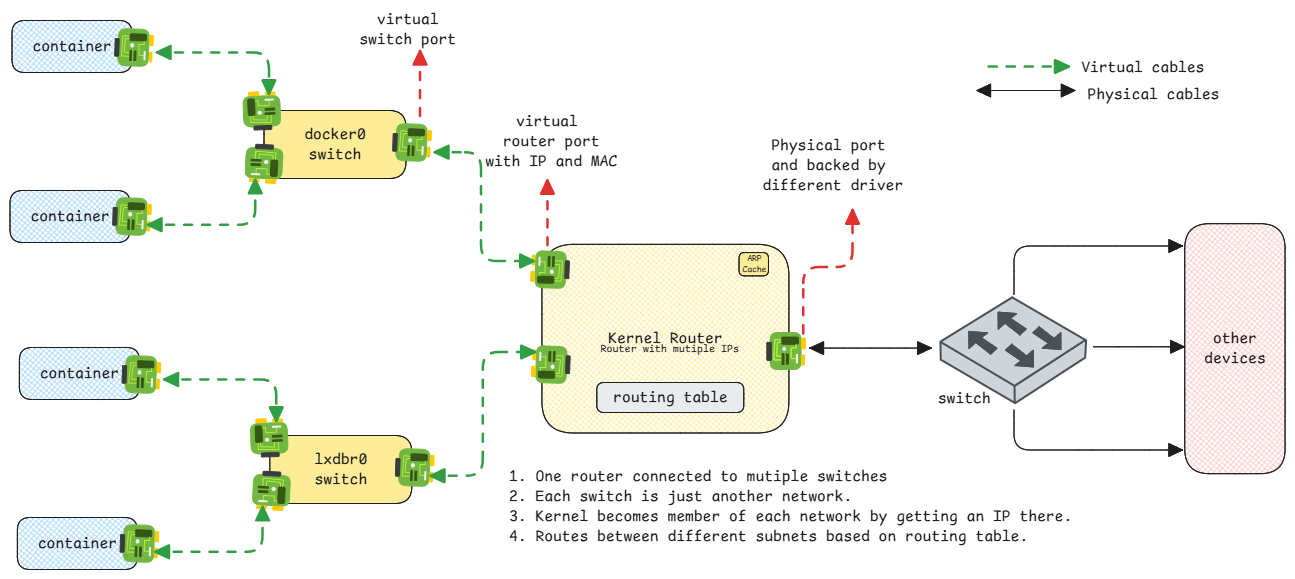
The key mental model: on every host, the kernel is the main and only router.
Every other bridge or internal network connects to one of its ports. This is how data flows in docker networks too. From the container, the data reaches the gateway IP on the kernel router. The kernel then uses its routing table to forward it to the physical port.