OAuth and OIDC
OIDC and OAuth are often used as if they mean the same thing. It helps to know the difference. A clear mental model keeps the concepts straight.
- OAuth - It's only about authorization. It manages authorization to API resources.
- OIDC - It's about authentication. It builds on OAuth. It runs once the user is authenticated.
-
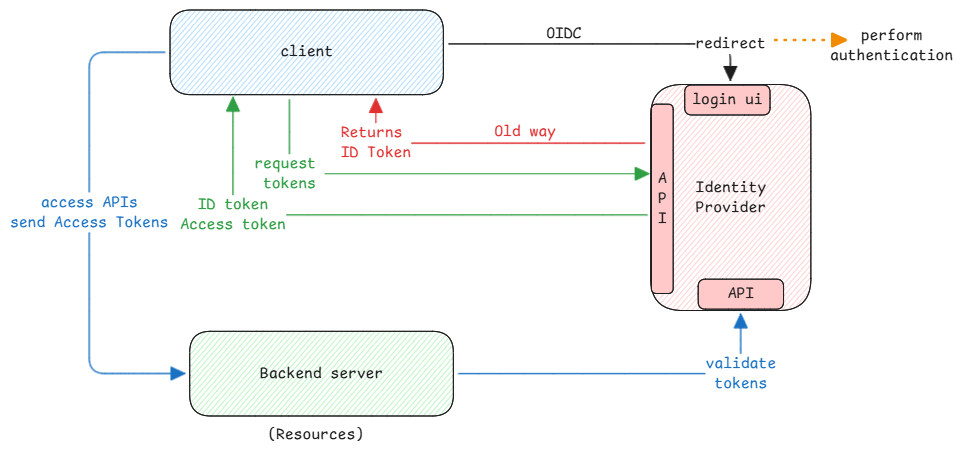
OIDC is about the authentication flow. After authentication, it emits an ID Token with user information. It also adds standards for the API endpoints of identity providers.
-
OAuth is about granting access to resources without a regular login. Identity providers issue access tokens. A token is just another form of the user. It says which resources the user can access.
OAuth existed first. OIDC was added on top, using the standards OAuth had set.
OAuth had already defined the flows to get access tokens from identity providers. OIDC just added the authentication layer and used it to get ID tokens.
Note that both ID tokens and access tokens are just base64 encoded strings. They aren't encrypted.
Still, they're digitally signed with private keys. Clients verify the signature with public keys to check the tokens are valid.
Pure OIDC use cases
In case of LinkedIn using Google to log in:
- Uses OIDC to authenticate the user using Google.
- Gets back an ID token from Google which contains user information.
- LinkedIn can use this information to map the user to its user data.
- It then uses its own authorization to connect to its APIs.
In this whole flow, no OAuth is used. It does receive access tokens. But it never uses them to reach Google's services or its own APIs.
ID Token vs Access Token
- ID Token - It refers to identity token. It contains information about the user.
- Access Token - It refers to the access the user has. It contains the authorization information of the user.
ID Token is part of the OIDC standards and access token is part of the OAuth standard. In case of a full OAuth flow, both tokens are returned.
Machine to Machine
OAuth 2.0 also enables authorization between two machines without any user interaction. This is called client credentials flow.
Here the client is also authenticated/identified but no OIDC flow is involved.
Client in OAuth always means a machine. Only user means a human user. This is why the client_id and client_secret are always for a machine.